Release Notes 60
- May 20
- 4 min read
Updated: Jun 16
That's a milestone worth marking — and we couldn't think of a better way to celebrate it than with an update that genuinely moves the needle for your business. Alongside a set of thoughtful UI and UX improvements that make day-to-day operations smoother and faster, this release brings a new business opportunity that opens up entirely new ways to attract and convert customers on your platform. Whether you're a current partner looking to grow or an entrepreneur evaluating what Playfood can do for your next venture — this one is worth your full attention. Dive in!
1. Redesigned Acceptance & Preparation Time Buttons
In a busy kitchen environment, every second counts. This month we've redesigned the order acceptance button and preparation time selection buttons in the Vendor App to make them significantly more visible, intuitive, and easy to interact with under pressure.
The updated design prioritises clarity: larger tap targets, stronger visual contrast, and a cleaner layout that lets a vendor's manager act quickly and confidently without hunting around the screen. It's a UI change, but in a high-volume kitchen setting, the impact is very practical. Fewer misclicks, faster acceptance, smoother operations from the moment an order lands.

2. Adjustable Order Timing After Acceptance
This one is a genuine operational upgrade — and one that benefits your vendors, your couriers, and your customers all at once.
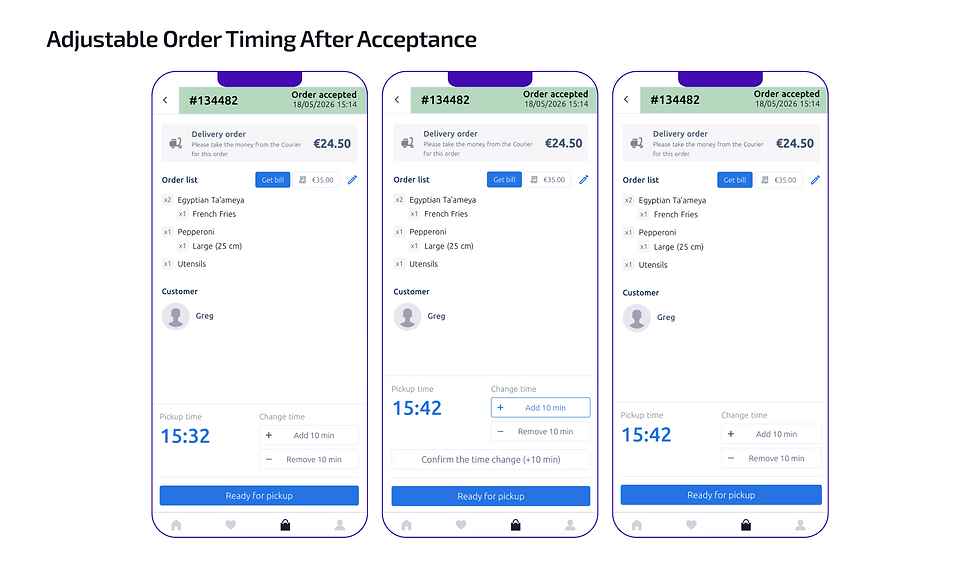
Previously, once a vendor accepted an order and set a preparation time, that time was fixed. But kitchens don't always run to schedule — sometimes a dish comes together faster than expected, and the order is ready well ahead of the original estimate. Until now, there was no way to reflect that in the system.
Now there is. Vendors can adjust the preparation time even after accepting an order, directly from the Vendor App, but before courier search has started. If the order is moving faster than planned, the manager can update the time accordingly — and courier search will begin earlier. If the order is already ready to go, the manager can set the preparation time to its minimum value and courier dispatch starts immediately or just hit the “Ready for pickup” button.
The impact goes beyond the kitchen: when a vendor updates the preparation time, all delivery estimations are automatically recalculated and updated on the customer's side in real time. Your customers see a more accurate arrival time, their order reaches them fresher and on time, and your platform's delivery experience improves with every order. It's a small control that adds up to a meaningfully better end-to-end experience.
3. Playfood App Embedding & Seamless User Authentication
This is the biggest business opportunity in this release — and it's especially relevant for partners who already operate their own app or digital ecosystem.
You can now embed the Playfood food delivery experience directly into your own app. A button plus a web view is all it takes — exactly the same model used within the Super App model designed by Onde and Playfood. When a customer taps it, the food delivery interface opens inline within your app, without redirecting them anywhere else. The experience stays inside your product, under your brand.
Here's how the integration works in practice. During the setup process, we agree on a shared key with you that allows the system to securely receive user data from your app. When a customer opens Playfood through your integration, their phone number is passed through automatically — and they are guided through the ordering flow without needing to register separately. If no phone number is available, they are taken through a standard registration flow instead. Either way, the process is smooth and requires minimal effort from the customer.
The result is a genuinely connected experience: customers who are already in your app can access food delivery without friction, without switching platforms, and without re-entering their details. For partners running multiple services or businesses — this is how you build a real ecosystem around your users rather than sending them elsewhere to order.
To get started with this integration, reach out to your Key Success Manager — the setup involves agreeing on the technical key, so it begins with a conversation with our team.
4. Back Button for Catalogues
A small change with a noticeable impact — especially for grocery platforms with long, category-rich catalogues.
When customers scroll deep into a grocery catalogue, getting back to the main screen previously required scrolling all the way back to the top. Now, the header stays fixed at the top of the screen at all times, with a persistent back button always visible regardless of how far down the customer has scrolled.
It sounds simple — because it is. But in grocery browsing, where customers move through many categories and items before deciding, removing that small moment of friction makes the experience feel smoother and more intuitive. Fewer drop-offs, easier navigation, happier customers.

5. Marketing Tab Statistic: Average Cart Total Fix
This one isn't a new feature — but it's an important correction that makes existing data you rely on trustworthy again.
The Marketing tab in the admin panel was displaying incorrect figures for average cart totals. That's now been identified and fully resolved. When you open the Marketing tab today, the average cart total data you see reflects your platform's real numbers — giving you the accurate baseline you need to make informed decisions about promotions, promo code thresholds, and pricing strategy.
This fix is part of our ongoing commitment to making the admin panel a genuinely reliable analytics tool for your business. We've made significant improvements to platform statistics over recent releases — if you haven't explored what's available yet, now is a good time. See more about recent analytics updates here.

Release 60 touches the full stack — vendor operations, customer acquisition, browsing experience, and data accuracy. Each update was built with a specific pain point in mind, and together they make your platform a more capable, more reliable business tool.
Current Playfood partners: reach out to your Key Success Manager to learn how to get the most out of these updates, particularly the third-party login configuration — it's worth a dedicated conversation.
Exploring Playfood for a new project? Get in touch with our Key Partners Manager to see the full platform in action and understand how these capabilities can support your launch and growth from day one.


Comments