Release Notes 61
Updated: Jul 22
Some releases are incremental and this one – is not. Release #61 introduces a long-awaited feature that our operating partners have been requesting — one that will transform the way promotions are managed across your entire marketplace. Alongside this, two focused updates bring greater precision to promo code targeting and enhanced functionality to the vendor mobile app. If you've been waiting for a comprehensive promotional toolkit, make sure you read this release carefully.
1. New Marketing Feature: Offers Are Live!
This was the focus of the entire sprint, and the result is clear to see. Offers is brand new functionality, designed from scratch to provide marketplace administrators and their vendors with a structured, scalable way to run promotions across the platform. Here's how it works at every level.
For Marketplace admins:
Offers can be found in the Marketing tab, where a new dedicated Offers section has been added. This is an admin-level feature, meaning that offers are created centrally by the Marketplace Administrator and made available to all vendors on the platform. Think of it as setting the promotional game's rules, while vendors decide how and when to play.

When creating an offer, admins can define its name, the discount range, the dates it will be active for, and the combination rules. Offers can also be set in multiple languages simultaneously — the correct language will be displayed automatically based on each user's settings.


The combination rule toggle is important: when it is off, other promotional activities can run alongside the offer on the same item. When it's on, however, only the rules of that specific offer apply, giving admins full control over how promotions stack.


Active offers appear as blue cards in the panel. Once an offer's end date has passed, it is automatically moved to the archive and turns grey. Admins can also manually pause and archive an offer at any time. Please note that once vendors have applied an active offer to their catalogue, admins can no longer edit its rules, so make sure you set them carefully before publishing.

For Vendors:
Vendors can access offers via the new 'Marketing' tab in their vendor panel, where they can view all the offers currently available on the marketplace. Vendors can then customise how they apply each offer within the boundaries set by the admin, choosing a discount within the defined range and selecting which sections, individual items or the entire catalogue the offer applies to. They can also set their own active date range within the admin's window.


Once an offer is live, vendors can easily identify which products are included, as they are clearly marked with a bright red line in the catalogue. There is no guesswork involved — it's full visibility. A new section called 'Offers' will also appear at the top of each vendor's catalogue list.


But why does this matter for vendors beyond the obvious? Vendors who apply offers are listed in a dedicated ‘Offers’ section at the top of the catalogue grid on the customer-facing marketplace. This gives them higher visibility and the opportunity to attract new regular customers. It's a promotional tool and a placement advantage in one.
There's also a significant operational benefit: previously, setting a promotion for catalogue items had to be done one item at a time. Offers removes that friction entirely. Vendors can now apply a promotion to an entire section, a selection of dishes or the whole catalogue with a single action.
One important operational note for admins: currently, no automatic notifications are sent to vendors when a new offer becomes available — this is by design, to avoid notification overload. Marketplace admins should therefore communicate new offers to their vendors through their own internal channels.
For Сustomers:
A new 'Offers' section has appeared on the customer side of the marketplace, placed prominently at the top of the screen where it receives the most visibility. The system automatically calculates the discount amount for each item based on the applicable offer rules, displaying it directly on the item card. Customers can see the saving before making a decision, which makes the offer genuinely effective at driving conversions.

A note on this first iteration:
In this release, offers are vendor-sponsored, meaning that vendors absorb the cost of the discounts that they apply within the admin-defined range. In future releases, this functionality will be expanded to include new logics and dependencies.
The best thing you can do right now is test it in your real market. Every partner who uses Offers in this iteration will help shape how it evolves in the next one.
2. Bulk Promo Code Assignments by Phone Number
The promo codes functionality in the Marketing panel has been upgraded with a powerful new targeting capability. You can now assign promo codes to specific customers using their phone numbers.


The potential applications are wide-ranging. For example, you can reward your most loyal customers — those who have placed ten or more orders this month. Re-engage inactive users. You can also turn your taxi users into food delivery customers by targeting those who use your ride-hailing app but haven't yet placed a food order — a natural move for Super App partners. Alternatively, you can resolve a service issue by sending a personal promo code to a customer who had a difficult delivery experience.
This feature enables you to assign promo codes in bulk, which was previously unavailable. The only caveat is that, for now, cohort segmentation should be done on the partners' side as the system only allows you to assign promo codes in bulk and not to segment the audience.
To assign a code to multiple numbers at once, simply enter them in the field separated by commas. The system will handle the rest.

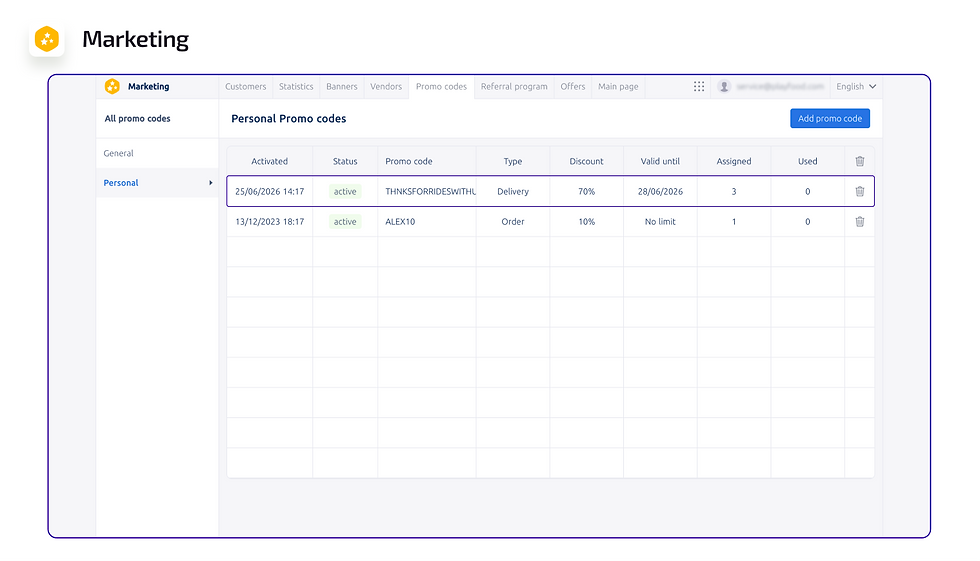
One useful detail: when a promo code is assigned to a user who hasn't used the food delivery service before, it will appear in the promo code settings under the 'Assigned codes' category for existing active users, or under the 'New users' category if it's assigned to an unregistered user. In the latter case, an account will be created for them. Clear segmentation, right where you need it.

3. Vendor App Enhancement
This update is part of a broader commitment, so it's important to understand the reasoning behind it. We are working to align the vendor web panel and the vendor mobile app, bringing all missing functionality to the app so that the two are identical. Managers should be able to run their entire operation from their phone just as effectively as from a desktop computer. Release #61 takes a significant step towards this goal.
This update enables vendor managers to view and edit working hours, apply offers to their catalogue and open or close the restaurant using the operation status button — all from their phone, without needing to switch to the web panel.
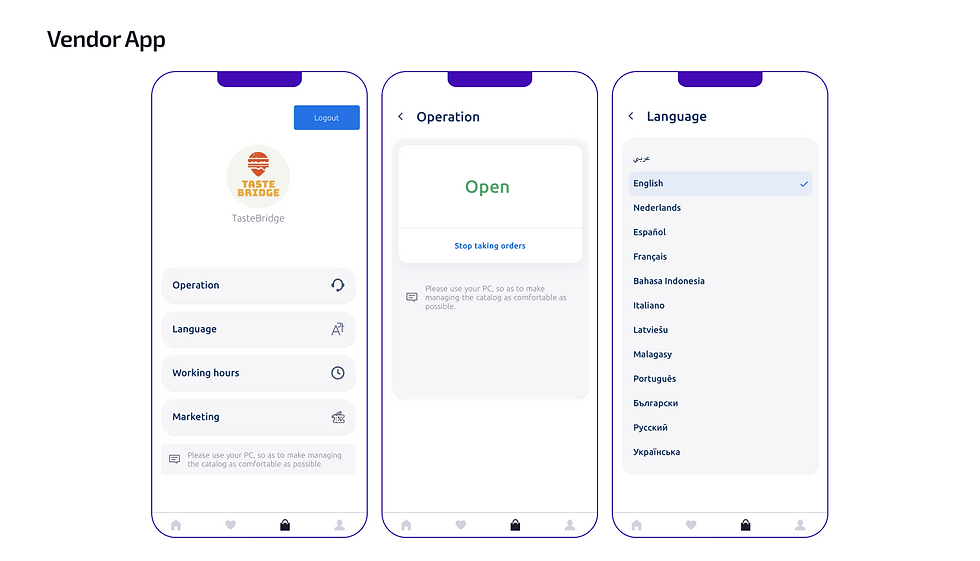

For vendors managing busy kitchens where a desktop computer isn't always within reach, this kind of flexibility can make a real operational difference. This is just the beginning — more web panel functionality will be made available on mobile in future releases.
New release brings the promotional infrastructure that your marketplace has been missing. Offers, targeted promo codes and a more capable mobile vendor experience: three updates that work together to help you increase orders, reward loyal customers and provide your vendors with the tools they need to grow alongside you.
Current Playfood partners, your Key Success Manager is ready to talk you through setting up Offers and help you plan your first promotion. Get in touch and let's get started.
Are you exploring Playfood for a new project? Contact our dedicated Partners Manager to see the full platform in action.


Comments