Release Notes 62
Updated: Jul 31
Each release we ship propels the platform forward, and Release #62 is no exception. This month, we are delivering a significant upgrade to the customer checkout experience and making meaningful improvements for Super App partners. We are also rolling out a series of targeted updates to the vendor panel and customer-facing interface. Some of these changes will be visible to your customers and will be immediately noticeable. Others work quietly in the background to keep your platform stable and your orders accurate. All of them matter.
1. Personal Promo Codes Redesigned From the Ground Up
This is the most significant customer-facing update in this release, affecting every order that your customers place.
The checkout page has been redesigned to include a dedicated, scrollable panel displaying all the personal promo codes available to the customer. Each promo code card shows its value and a brief description, as well as a button that applies the code with one tap. The experience is clean and intuitive, and is designed to encourage conversions.
Customers no longer need to remember a promo code or copy it carefully from somewhere else — all available personal codes are already right there on the checkout page as prompts, ready to apply in one tap.

Here's how it works, step by step: When a customer taps to apply a promo code, one of two things happens. If the code is valid and all conditions have been met, the card instantly turns green to confirm that the discount has been applied, and the savings are immediately reflected in the order receipt. If certain conditions haven't been met and the code can't be applied yet, a pop-up banner appears explaining exactly what needs to be done to use it. There's no confusion and no dead ends.
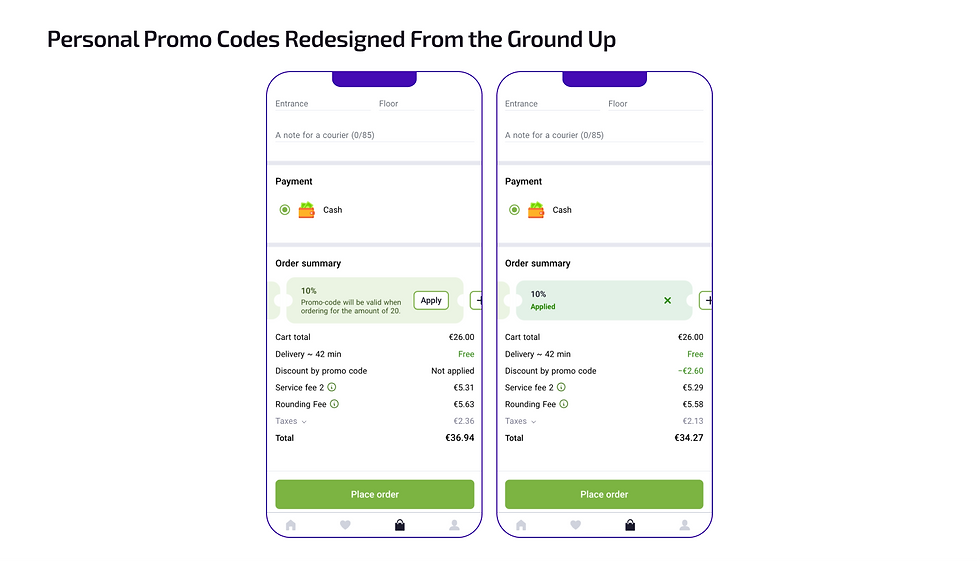

The process is slightly different for general promo codes, those available to all customers on the marketplace. These codes don't appear in the personal promo code list. Instead, customers can scroll to the end of the list, where they will see a button to enter a promo code manually. Tapping this button opens an input field. If the code is valid, it is applied in exactly the same way: the card turns green and the discount is confirmed.

For a full guide on assigning personal promo codes in bulk, see our previous release notes here:
2. Checkout Page Refresh
In addition to the update to the promo code, the checkout page has undergone a broader visual refresh that is worth highlighting. The page is now divided into clearly defined sections, the order total is displayed in bold, and the promo codes section is distinct and easy to locate.
The result is a more modern, organised checkout process that is easier to complete, reducing friction at the most critical moment of the customer journey.
However, this is not the final word on the checkout experience. We have significant UI/UX improvements planned, and this refresh is the first step in that direction. More to come.

3. Arabic Receipt Is Reviewed and Corrected
This fix has been a long time coming for partners operating in Arabic-speaking markets. We have thoroughly reviewed and corrected the Arabic translation of the customer receipt to ensure that it displays correctly for all order types, item combinations and number formats.
For your customers in MENA markets, this means a correctly worded receipt every time: no wrong translation artefacts and no formatting issues, regardless of the order. It's a small but important step in delivering an excellent localised experience.
4. More Resilient Integration Between Onde & Playfood
This update is an important one for our Super App partners operating across both Onde and Playfood. We have strengthened and enhanced the integration layer between the two platforms, significantly reducing the risk of issues on one platform affecting the other. As with any technical system, edge cases can still occur, but our team is always on hand to investigate and resolve any issues quickly.
5. Prioritised Dish Components: Put Your Best Add-Ons First
This update gives vendor administrators a new level of control over how dish components are presented to customers, as well as providing a smart way to influence order value.
Dish components are now displayed as an ordered list, and admins can set the sequence in which they appear. Popular, frequently added or high-value components can be placed at the top, increasing their visibility and the likelihood that customers will add them to their order.
This may seem like a subtle change, but the commercial logic is clear: placing the right component in the right position will lead to a higher average order value over time. It's a small configuration decision with a compounding effect.


6. "My Orders" Tab in the Customer App
A small but meaningful change: the 'Orders History' button is now called 'My Orders' across the platform. This is a more intuitive label that is better aligned with global app standards and will be instantly familiar to customers regardless of their background. It means less thinking and faster navigation.

7. System Notifications Now Reflect Vendor Type
Previously, all system notifications referred to vendors as 'restaurants', regardless of the type of business they actually operated. For partners running grocery stores or other non-restaurant businesses, this caused unnecessary confusion.
System notifications have now been updated to correctly recognise the type of vendor, so notifications will now read either 'restaurant' or 'store', depending on the vendor's business type. This update brings accuracy and professionalism to every automated touchpoint on your platform.

8. Kurdish Locale Now Available
Playfood continues to expand its language support, and this month we are pleased to welcome Kurdish to the platform. This brings the total number of localisations supported by Playfood to 14, making it one of the most linguistically accessible food delivery solutions for emerging markets.
For partners operating in Kurdish-speaking regions, this means that their customers can now use the platform in their native language for everything from browsing the catalogue to completing the checkout process. A locally relevant experience is not just a bonus, it drives conversions.

Release #62 focuses on the most important moments in the customer journey, such as the checkout process, receipt delivery and navigation clarity, while strengthening the foundations for Super App partners and vendor operations. Each update brings us closer to a platform that feels as polished as the businesses running on it.
Current Playfood partners: reach out to your Key Success Manager if you'd like to walk through any of these updates or discuss how to get the most out of the new checkout experience for your customers.
Exploring Playfood for a new project? Contact our Key Partners Manager to see the full platform in action.


hi88 com mình thấy bạn bè nhắc hoài nên cũng tò mò ghé thử cho biết, chứ không có ngồi lâu. Vào cái là thấy giao diện khá dễ chịu, kiểu không bị nhồi chữ hay lòe loẹt quá. Mình để ý cái menu đặt ngay chỗ dễ nhìn nên bấm qua lại mấy mục cũng nhanh, không phải mất công tìm. Nội dung trên trang chia thành từng khối tách bạch, nhìn lướt là biết phần nào ra phần đó, đỡ rối mắt. Mình thích kiểu trình bày gọn gàng như vậy, nhất là khi chỉ xem vài phút rồi thoát. Nói chung cảm giác họ sắp xếp khá “ngăn nắp”, các khối thông tin và thanh điều hướng…
đăng nhập fly88 tối qua lúc nghỉ tay lướt thử vài phút, mình cũng hơi nghi ngại kiểu “lại thêm một trang rối rắm” nhưng vào rồi thấy hướng đi khá rõ. Mình không ngồi test trò gì đâu, chủ yếu nhìn cách họ trình bày và đường đi nước bước để lần sau cần thì bấm cho nhanh (đỡ mất công mò). Cái mình để ý là mấy khung thông tin đặt thẳng hàng, tiêu đề chia ra từng mảng nên kéo xuống là hiểu đang nói phần nào, không phải nhảy qua lại quá nhiều. Thêm nữa, chỗ liên quan nạp rút giao dịch họ để ngay trong luồng nội dung nên nhìn phát thấy liền, kiểu họ…
https://rr88k1.com/ mình bấm vào chủ yếu vì tò mò thôi, kiểu xem thử giao diện ra sao chứ không định ngồi đọc kỹ. Vừa vào cái là thấy trang sắp xếp khá thoáng, nhìn không bị rối hay “ngợp” như nhiều chỗ khác. Mình để ý nhất là thanh menu đặt ngay chỗ dễ thấy nên chuyển qua lại mấy mục rất nhanh, không phải kéo lên kéo xuống tìm. Mấy phần thông tin cũng được chia thành từng khối rõ ràng, lướt qua là hiểu đại khái đang có gì trên trang. Nói chung hợp với kiểu người vào xem nhanh bố cục, và mình thấy cách họ nhóm nội dung theo từng block nhìn khá gọn, menu cũng…